
Have you ever been browsing Facebook, on mobile or on desktop, and wanted to save something that you saw in your News Feed to read later?
I used to take screen shots of the post on mobile and then have to remember to check my photos later to find the information.
Now I can save these posts within Facebook, with just one click of a button!
The new Facebook “Save” feature works well and is incredibly useful. Facebook needed this win after the Messenger app fail. (If you haven’t read this article and you’ve downloaded Messenger, read it now).
Right now the Save feature only works for links to outside content, including video, and NOT individual status updates and photos.
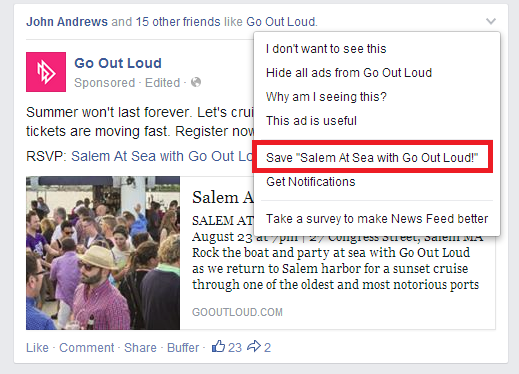
To Save an article you want to read later, simply click on the arrow in the top right of the post:
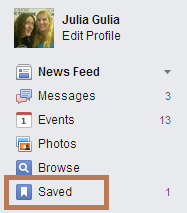
To find your Saved links, click on Saved in the left hand side of your News Feed.
Easy peasy!
To alert your followers to this new feature and to encourage them to save your links, Mari Smith has a great idea – insert a variation on this text in your link posts: Click or tap the little arrow in the top right of this post in your news feed, then click/tap save! To access your saved links, look for the new “Saved” link in your Favorites on the left of your news feed).
See her example here:
Because Facebook is now giving News Feed preference for links – after years of telling us that photos ruled and NOT links – Mari also suggests changing up your post ratio to 50% links, 25% photos/videos and 25% status updates.
But don’t take our word for it – always test it out yourself, for your page and your online community, of course!
How are you planning on using the new Save feature?